
Symptom:
The signature pad is not shown in the list of available signature devices, although it is correctly connected.
Cause:
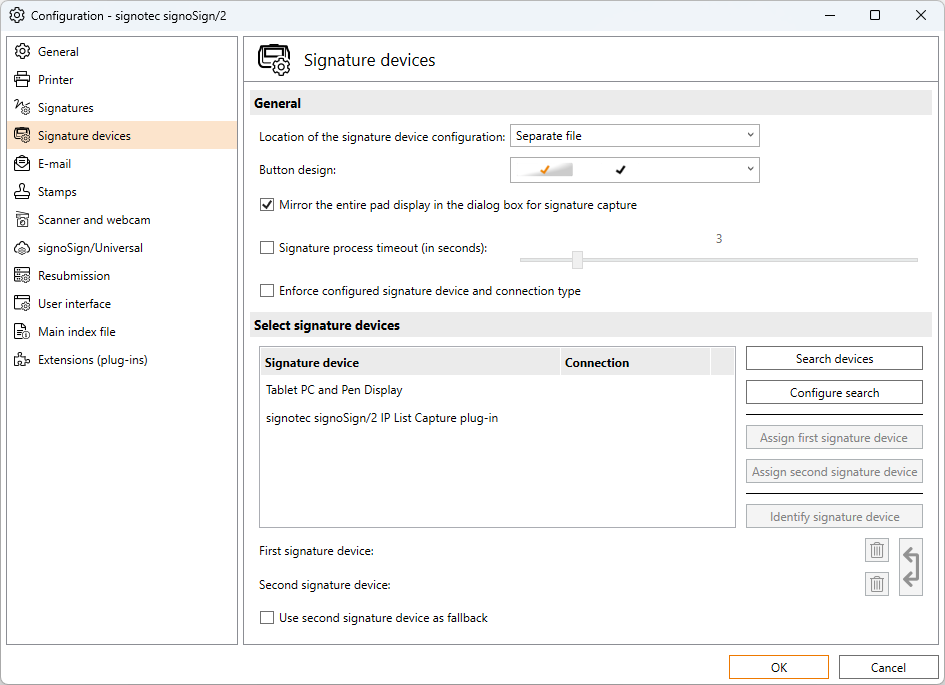
By default, only the entries Tablet PC and Pen Display as well as any installed and licensed plug-ins are displayed as signature devices. Available signature pads are only shown after a manual device search has been performed. After a search has been successfully completed and the configuration has been closed, the detected signature pads are not automatically displayed again in the list when reopening the signature device settings.
Solution:
Perform a search via Search devices. If necessary, adjust the filter settings for connection type or operating mode beforehand via Configure search so that the signature pad can be found. Then select the desired signature pad and assign it using Assign first signature device. The assigned signature pad will then be displayed in the lower section and will be used for the electronic signature as long as it is configured there.